<?xml version="1.0" encoding="utf-8"?><feed xmlns="http://www.w3.org/2005/Atom" ><generator uri="https://jekyllrb.com/" version="3.10.0">Jekyll</generator><link href="https://cnboonhan.github.io/feed.xml" rel="self" type="application/atom+xml" /><link href="https://cnboonhan.github.io/" rel="alternate" type="text/html" /><updated>2025-12-31T09:22:10+00:00</updated><id>https://cnboonhan.github.io/feed.xml</id><title type="html">CN Boon Han</title><subtitle>Your Name&apos;s academic portfolio</subtitle><author><name>CN Boon Han</name><email>cnboonhan.public@gmail.com</email></author><entry><title type="html">Speeding Up Downloads using Multiple WANs on Raspberry Pi</title><link href="https://cnboonhan.github.io/posts/2025/12/blog-download-speedup/" rel="alternate" type="text/html" title="Speeding Up Downloads using Multiple WANs on Raspberry Pi" /><published>2025-12-31T00:00:00+00:00</published><updated>2025-12-31T00:00:00+00:00</updated><id>https://cnboonhan.github.io/posts/2025/12/Speeding-Up-Downlods-using-Multiple-WANs-on-Raspberry-Pi</id><content type="html" xml:base="https://cnboonhan.github.io/posts/2025/12/blog-download-speedup/"><![CDATA[<p>We may often find ourselves in situations needing to download large files. However, our download link may not always have enough bandwidth, or we could be rate-limited by the WAN provider. Wireless@SGx, for example, is widely used but has a limit of 5Mbps (although practically it could reach 30Mbps). How could we improve this?</p>

<h1 id="idea">Idea</h1>
<p>Large downloads are often the result of having to download multiple files in aggregate. For example, a model checkpoint download often contains multiple <code class="language-plaintext highlighter-rouge">.safetensor</code> files. If we have multiple authenticated WANs on a router, we should be able to load balance the individual downloads among these WANs and utilize a larger overall bandwidth.</p>

<h1 id="requirements">Requirements</h1>
<p>In this example, I am utilizing two WANs links. One link will use the onboard Wifi chipset. Another link will use USB tethering from a phone. Modify accordingly if you increase number of WANs / use Ethernet etc.</p>

<p>If you intend to use USB Wifi Adapter, do take note of <a href="https://forum.openwrt.org/t/usb-wi-fi-that-work-in-openwrt-please-add-to-list/185059/8?page=7">firmware compatibility.</a></p>

<ol>
  <li>Raspberry Pi ( I use RPi 5 )</li>
  <li><a href="https://openwrt.org/toh/raspberry_pi_foundation/raspberry_pi#installation">OpenWRT Factory Image for Raspberry Pi</a></li>
  <li>SD Card</li>
  <li>Developer Laptop</li>
  <li>Ethernet Cable</li>
  <li>Mobile Phone &amp; Cable for USB tethering</li>
</ol>

<h1 id="setup">Setup</h1>
<ol>
  <li>Follow the <a href="https://openwrt.org/toh/raspberry_pi_foundation/raspberry_pi#how_to_flash_openwrt_to_an_sd_card">instructions</a> to flash an SD card with the OpenWRT Factory Image.</li>
  <li>Use Ethernet Cable to connect your Laptop to the Raspberry Pi.</li>
  <li>Access Router Configuration Page at <code class="language-plaintext highlighter-rouge">192.168.1.1</code> through a browser.</li>
  <li>Access the wireless page and authenticate to a Wifi hotspot. Your OpenWRT router should now have access to Internet.</li>
  <li>Access Router over <code class="language-plaintext highlighter-rouge">ssh root@192.168.1.1</code></li>
  <li><code class="language-plaintext highlighter-rouge">opkg update &amp;&amp; opkg install kmod-usb-net-rndis kmod-usb-net-cdc-ether usbutils luci-app-mwan3</code></li>
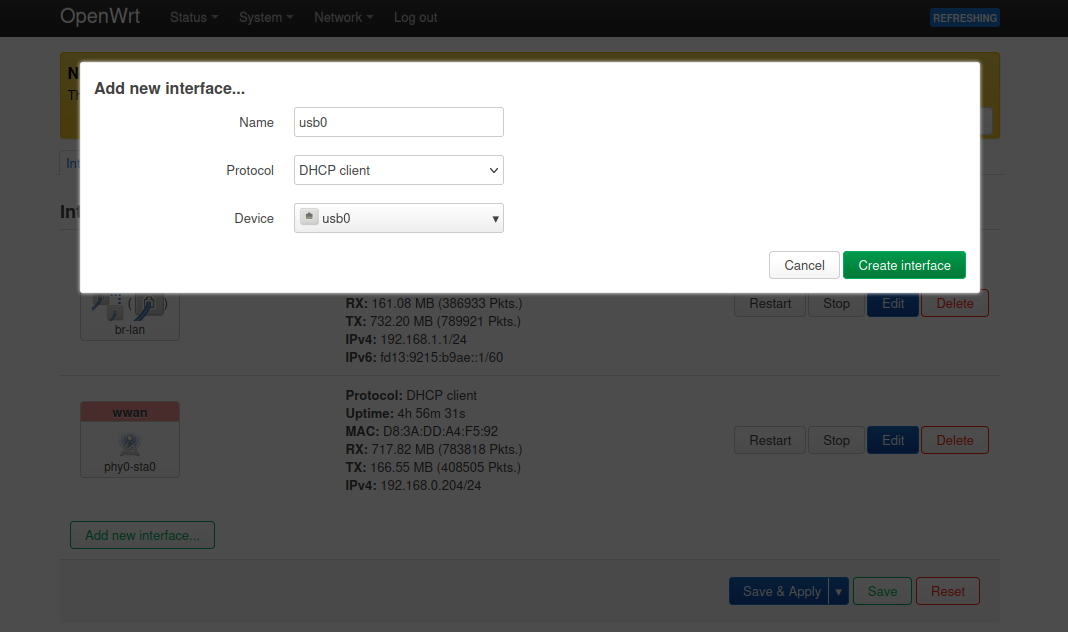
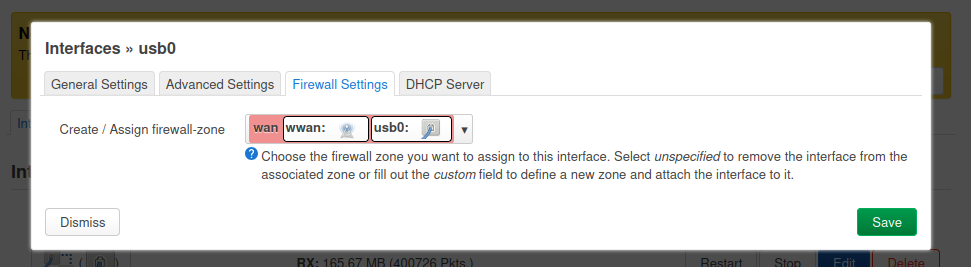
  <li>On the Admin page, add a new DHCP client with the <code class="language-plaintext highlighter-rouge">usb0</code> interface. Assign it to <code class="language-plaintext highlighter-rouge">wwan</code> firewall zone. Ensure that a gateway metric is set for the <code class="language-plaintext highlighter-rouge">usb0</code> and <code class="language-plaintext highlighter-rouge">wwan</code> interfaces. Set slightly different values for each (<code class="language-plaintext highlighter-rouge">usb0</code> to <code class="language-plaintext highlighter-rouge">20</code>, <code class="language-plaintext highlighter-rouge">wwan</code> to <code class="language-plaintext highlighter-rouge">10</code>, for example.)
<img src="https://cnboonhan.github.io/files/blog/blog-download-speedup/create-usb-interface-openwrt.png" alt="Create USB Interface OpenWRT" />
<img src="https://cnboonhan.github.io/files/blog/blog-download-speedup/usb-interface-firewall-zone-openwrt.png" alt="Firewall Zone for USB Interface" />
<img src="https://cnboonhan.github.io/files/blog/blog-download-speedup/set-gateway-metric-openwrt.png" alt="alt text" /></li>
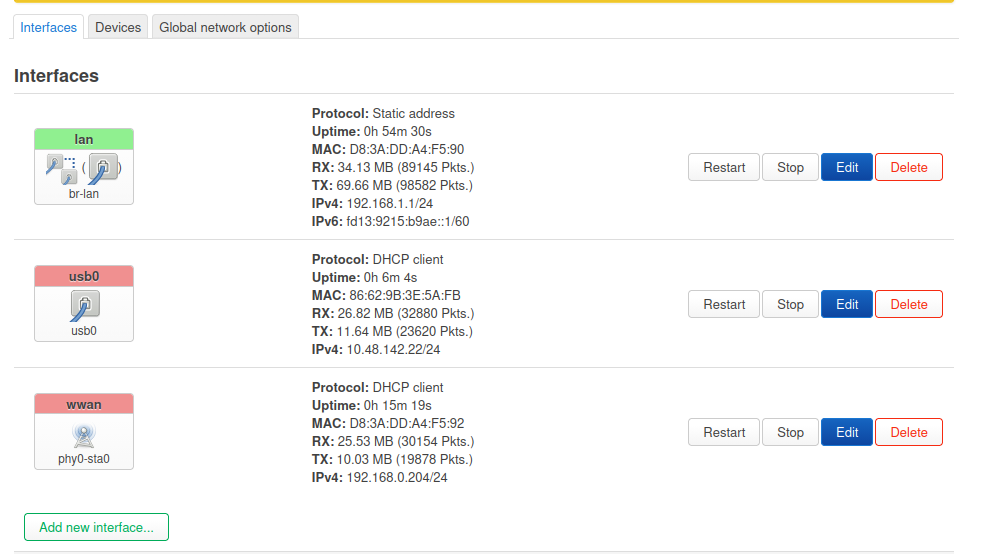
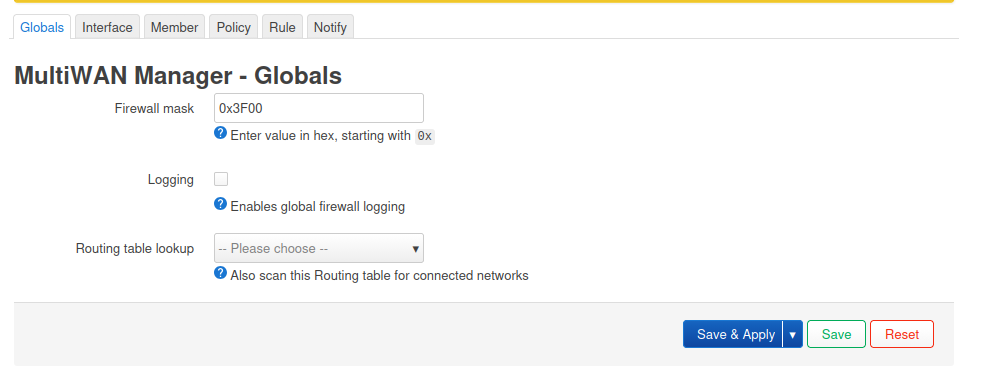
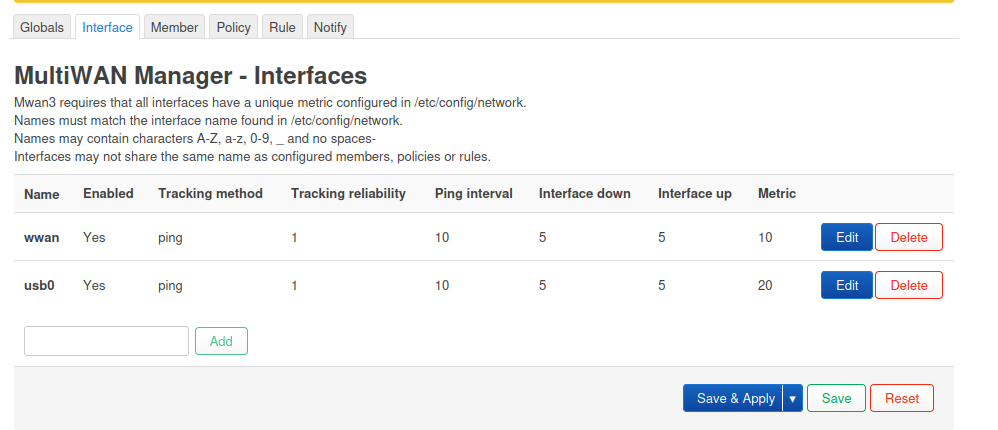
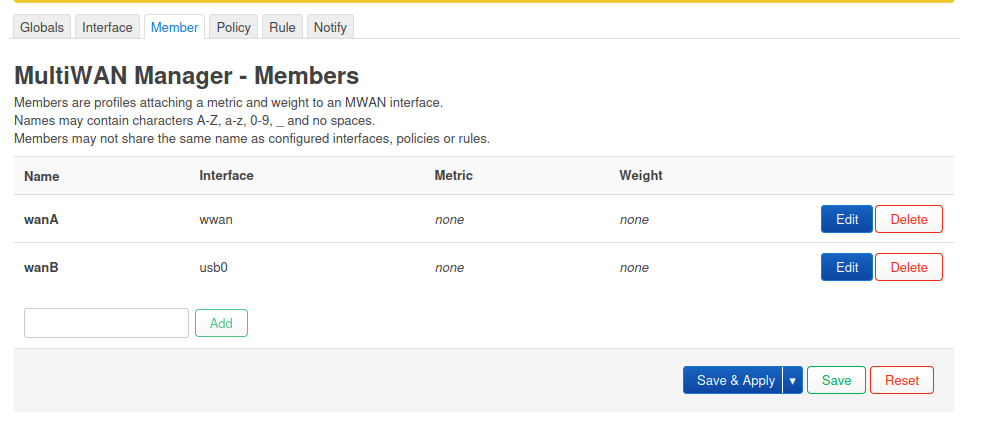
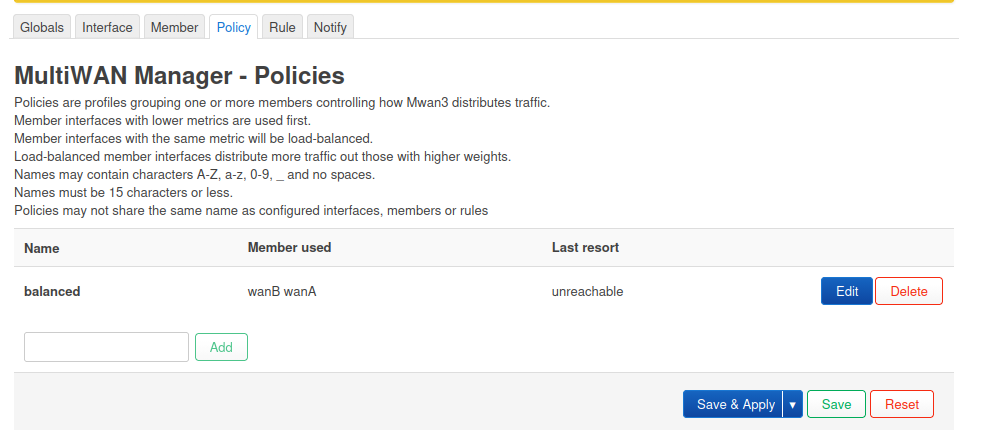
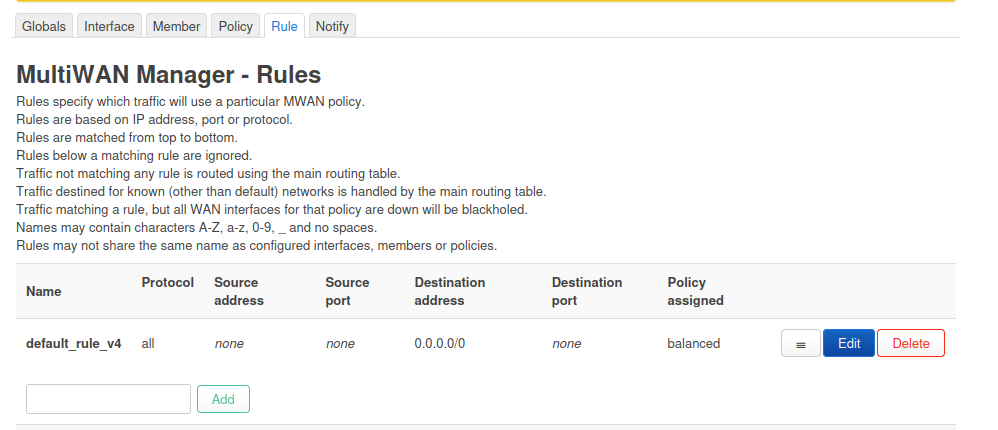
  <li>Configure the MultiWAN Manager under <code class="language-plaintext highlighter-rouge">cgi-bin/luci/admin/network/mwan3</code> with the following:
<img src="https://cnboonhan.github.io/files/blog/blog-download-speedup/interfaces-openwrt.png" alt="alt text" />
<img src="https://cnboonhan.github.io/files/blog/blog-download-speedup/multiwan-globals-openwrt.png" alt="alt text" />
<img src="https://cnboonhan.github.io/files/blog/blog-download-speedup/multiwan-interfaces-openwrt.png" alt="alt text" />
<img src="https://cnboonhan.github.io/files/blog/blog-download-speedup/multiwan-members-openwrt.png" alt="alt text" />
<img src="https://cnboonhan.github.io/files/blog/blog-download-speedup/multiwan-policies-openwrt.png" alt="alt text" />
<img src="https://cnboonhan.github.io/files/blog/blog-download-speedup/multiwan-rules-openwrt.png" alt="alt text" /></li>
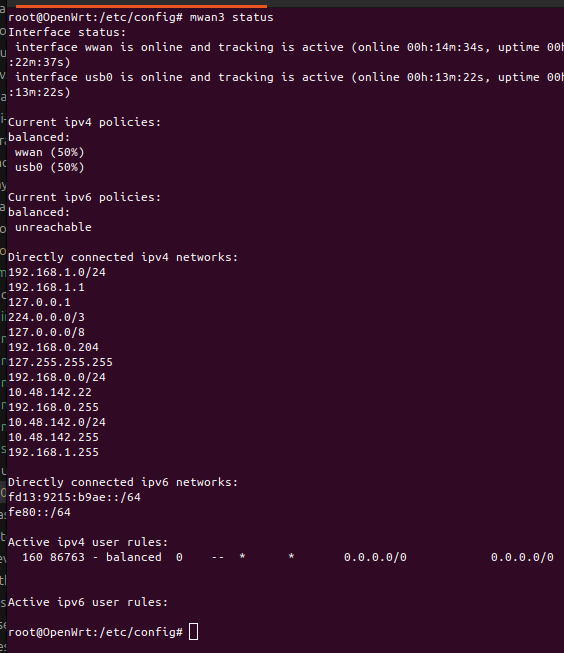
  <li>Run on SSH terminal: <code class="language-plaintext highlighter-rouge">mwan3 status</code>. Verify that both WANs are online, and the load balancing ratio is 50/50.
<img src="https://cnboonhan.github.io/files/blog/blog-download-speedup/multiwan-status-openwrt.png" alt="alt text" /></li>
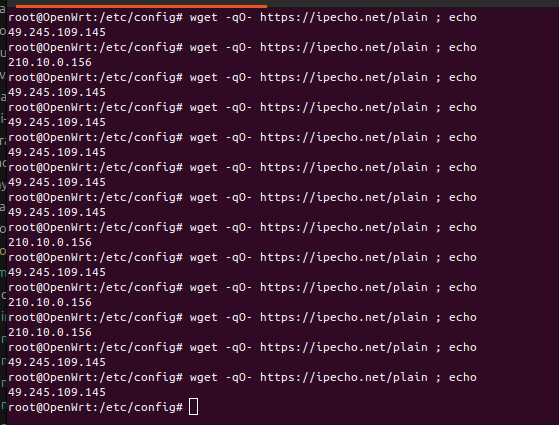
  <li>Run on SSH terminal multiple times: <code class="language-plaintext highlighter-rouge">wget -qO- https://ipecho.net/plain ; echo</code>
<img src="https://cnboonhan.github.io/files/blog/blog-download-speedup/load-balancing-result-openwrt.png" alt="alt text" /></li>
</ol>

<p>In theory, this arrangement should allow you to load balance multiple download HTTP requests across your WANs. An additional benefit is the automatic failover that triggers on link failure.</p>]]></content><author><name>CN Boon Han</name><email>cnboonhan.public@gmail.com</email></author><category term="Infrastructure" /><summary type="html"><![CDATA[We may often find ourselves in situations needing to download large files. However, our download link may not always have enough bandwidth, or we could be rate-limited by the WAN provider. Wireless@SGx, for example, is widely used but has a limit of 5Mbps (although practically it could reach 30Mbps). How could we improve this?]]></summary></entry></feed>